Introduction
The days of juggling three or four separate apps to produce a single piece of video content are fading fast. Modern creators expect to drop in a reference image, generate motion, layer in synchronized audio, and export a finished clip—all without leaving a single browser tab. That expectation has reshaped the market, and a new class of unified AI video generator platforms has emerged to meet it, bundling image creation, video rendering, and audio synthesis into a single creative pipeline.
In this roundup, we take a hard look at ten platforms that genuinely integrate image, video, and audio workflows under one roof. Some lean toward cinematic storytelling, others toward marketing automation, and a few toward multi-reference consistency. The goal here is not to crown a single winner, but to help you figure out which workflow matches your actual production needs.
How We Test
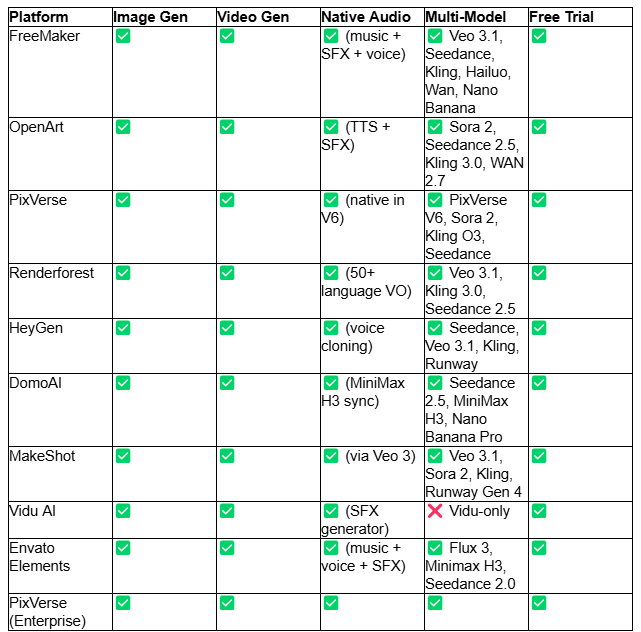
To evaluate each platform fairly against the theme of "combining image, video, and audio in one workflow," we focused on four core dimensions:
- Image + Video + Audio Integration — Does the platform natively generate or edit all three asset types within a single interface, or does it rely on external tools?
- Multi-Model Access — How many leading AI engines (Veo, Sora, Kling, Seedance, MiniMax, Nano Banana, etc.) are available in one workspace?
- Workflow Continuity — Can users move from image creation to animation to audio layering without exporting, re-importing, or breaking the project context?
- Output Flexibility — Resolution options, aspect ratios, commercial rights, and watermark policies.
Pricing is included for context, but the primary scoring is based on the depth of the unified workflow.
TL;DR Comparison Table
Website List
FreeMaker
What is it?
FreeMaker is a browser-based AI video generator that consolidates video, image, music, and voice generation inside a single multi-model workspace. Rather than switching tabs between a visual tool, a motion engine, and an audio editor, creators move linearly from an image to a scene to a finished soundtrack within the same dashboard.
Features
- Text-to-video, image-to-video, and video-to-video restyling (anime, claymation, cyberpunk, watercolor, etc.)
- Native audio-visual co-generation: synchronized spatial stereo audio, Foley effects, ambient soundscapes, music, and lip-sync in 8+ languages
- Integrated models: Google Veo 3.1, ByteDance Seedance 2.0, Kling, Hailuo, Wan, Nano Banana
- First & final frame control, multi-shot storytelling, and smart scene extension
- AI Music Generator producing royalty-free songs up to 8 minutes in 50+ languages
- A suite of ready-to-use utilities including an AI image combiner, AI Avatar Maker, AI Video Ads generator, and Unblur Video enhancer
- Resolutions up to 4K, with 24/30/60 fps and multiple aspect ratios
Pricing
- Lite: $14.9/month (300 credits, 720p)
- Pro: $29.9/month (600 credits, 1080p)
- Premium: $149.9/month (3,200 credits, 1080p, priority support)
- Free credits: Up to 60 via a 7-day daily check-in
Pros & Cons
- True three-in-one workflow (image → video → audio) in a single project
- Multiple leading video engines accessible from one dashboard
- Native music + SFX generation reduces post-production
- No dedicated avatar-based talking-head workflow like HeyGen
- Credit pool is modest on the Lite tier for heavy video users
Best for
Independent creators, marketers, and small studios who want to script, visualize, animate, and score a video entirely in one place without hopping between tools.
DomoAI
What is it?
DomoAI is a multi-model AI video generator and image creation platform best known for its Omni Reference system, which blends up to 50 image, video, and audio references into a single generation.
Features
- Omni Reference: assign roles (character, scene, motion) across 50 inputs
- AI Music Video Generator turning portraits + audio into cinematic clips
- Character to Video, Talking Avatar, Frames to Video, Text/Image/Video to Video
- Nano Banana Pro for batch image editing (up to 9 images), 4K/6K upscaling
- Integrated models: Seedance 2.5, MiniMax H3 (with native synced dialogue/SFX/room tone), Nano Banana Pro & 2
- Fast Mode (credit-based) and Relax Mode (unlimited queued generations)
Pricing
- Basic: 9/moannual(13 monthly)
- Standard: 29/moannual(42 monthly)
- Pro: 99/moannual(142 monthly)
- Team: $99/seat annual
Pros & Cons
- Omni Reference is one of the strongest reference-fusion systems available
- MiniMax H3 automatically outputs dialogue, SFX, and ambient audio
- Relax Mode offers unlimited generations on supported models
- No standalone music composition tool
- Longer video durations are Fast Mode only
Best for
Creators making multi-scene narrative content, music videos, and anime restyled footage where character and scene consistency matter.
OpenArt
What is it?
OpenArt positions itself as an AI Creator Studio, running the industry's leading video, image, and audio models in one workspace—plus a Director feature that orchestrates multi-scene stories from a single brief.
Features
- Video models: Seedance 2.5, Kling 3.0, Sora 2, WAN 2.7, LTX-2.3, Pixverse, Gemini Omni Flash
- Image models: GPT Image 2.0, Grok Imagine, Qwen Image 3, Nano Banana 2, Seedream 5.0 Pro
- Audio models for TTS, SFX, and audio generation
- OpenArt Director: short films, ad creatives, music videos, explainers, micro dramas
- Motion Sync & Lip Sync, Character Builder for consistent faces across scenes
- Conversational editing suite — chat to swap characters, backgrounds, or extend clips
Pricing
- Starter: $14/mo (billed annually $13/mo) — 4,000 credits
- Plus: 34/mo(27/mo annual) — 12,000 credits
- Pro: 56/mo(44/mo annual) — 24,000 credits
- Wonder: 240/mo(175/mo annual) — 106,000 credits
Pros & Cons
- Director feature structures long-form stories automatically
- Deep access to premium video + image + audio models
- Conversational editing simplifies iteration
- Audio tools are more utility-focused than full composition
- Credits can deplete quickly on premium video models
Best for
Creators producing short films, micro dramas, and episodic content who want narrative structure baked into the workflow.
PixVerse
What is it?
PixVerse is an AI video generator and visual creation platform designed for content creators, marketing teams, and e-commerce brands, with native audio built into select models.
Features
- Text-to-video with a structured prompt formula (subject + setting + action + camera + light + sound + format)
- Image-to-video preserving subject identity, lighting, and composition
- PixVerse V6 generates 1080p video with native audio
- Multi-model access: Sora 2, Kling O3, Seedance 2.5, MiniMax H3, Wan 3.0, Grok Imagine
- Specialized mini-apps: Ad Master, Director Shots, Promo Mix, Sound Effect Generator, Fashion Beat, Vibe MV, Product Video Remix
- ISO/IEC 27001 certified; Web, Mobile, API, and CLI access
Pricing
- Basic: Free (60 initial + 30 daily credits)
- Standard: $8/mo annual
- Pro: $24/mo annual
- Premium: $48/mo annual
- Ultra: $149/mo annual
Pros & Cons
- Native audio in V6 removes a post-production step
- Massive mini-app library for specific marketing use cases
- Strong credit value on annual plans
- Interface complexity may overwhelm new users
- Audio depth varies by model
Best for
E-commerce teams, marketing agencies, and ad creators who need rapid, modular production of branded video content.
Renderforest
What is it?
Renderforest is a cloud-based AI video generator and creative platform that bundles video, image, logo, and website creation under one subscription.
Features
- Hybrid stack of frontier models: Veo 3.1, Kling 3.0 Omni, Seedance 2.5, MiniMax H3, Pixverse V6
- Text-to-video, image-to-video, and a Music Video Generator that matches rhythm and mood
- Multilingual voiceovers in 50+ languages
- 1,200+ pre-designed studio-quality templates
- Smart Edit for scene-level revisions, unified editing timeline
- Up to 12-minute long-form video support
- AI image generator, logo maker, mockup maker, and website builder included
Pricing
- Free: $0 (with watermarks)
- Lite: $8/mo annual (4,800 credits/year)
- Pro: $19/mo annual (19,200 credits/year) — Most Popular
- Business: $39/mo annual (36,000 credits/year, 4K exports)
- Pay-per-export: $24 per HD1080 video
Pros & Cons
- Long-form support (up to 12 minutes)
- Massive template library accelerates production
- Pay-per-export option for one-off projects
- Template-first design may feel restrictive for pure prompt-based creators
- Credit math can be confusing across models
Best for
Small businesses and marketers who want templated video, image, and audio all in one tool, plus website and logo utilities as a bonus.
HeyGen
What is it?
HeyGen is an AI video generator specializing in digital twin avatars, voice cloning, and automated multilingual video production, with integrated image and audio generation.
Features
- Personal Avatars via 15-second phone/webcam video + Avatar V model
- Phoneme-level lip sync in 177+ languages
- Video Agent: converts scripts, URLs, PDFs, or PPTs into fully rendered videos
- Embedded models: Seedance 2.0 (B-roll), Veo 3.1 (image animation), Nano Banana, Seedream, Kling, Runway, Hailuo
- Voice Director, Voice Mirroring, Gesture Control, Brand Kits
- One-click video translation into 175+ languages with lip-sync alignment
- Multimodal inputs: text, image, audio, PDF
Pricing
- Free: 3 videos/month, up to 1080p
- Creator: 29/mo(24/mo annual) — 600 credits
- Pro: 49/mo(39/mo annual) — 1,000 credits, 4K
- Business: $149/mo — 1,500 credits, 60-min videos
- Enterprise: Custom
Pros & Cons
- Best-in-class avatar + voice cloning workflow
- Script-to-video automation is extremely polished
- Translation feature preserves vocal tone
- Image generation is secondary to avatar-driven video
- Pricier starting tier compared to competitors
Best for
Corporate trainers, educators, enterprise marketers, and anyone who needs talking-head videos at scale across multiple languages.
MakeShot
What is it?
MakeShot is an AI video generator platform that unifies 10+ advanced models, allowing side-by-side comparison of outputs across engines like Veo, Sora, Kling, and Runway.
Features
- Multi-model access: Veo 3/3.1, Sora 2, Kling, Wan 2.5/2.7/3.0, Grok, Runway Gen 4, Seedance, Flux
- Text-to-video, image-to-video, text-to-image, image-to-image
- Native audio generation via Veo 3 (synchronized dialogue, SFX, ambient)
- First and last frame control
- Multi-reference image uploads for character and brand consistency
- Resolutions up to 4K via premium models
- Full commercial rights, no watermarks
Pricing
- Starter: 8.3/moannual(29.99 monthly)
- Pro: 25/moannual(89.99 monthly)
- Unlimited: 75/moannual(149.99 monthly)
- 50% off limited-time sale across tiers
Pros & Cons
- Side-by-side model comparison is powerful for A/B testing
- Unlimited plan offers no-credit basic/enhanced generations
- Full 4K + commercial license
- No dedicated music composition tool
- Monthly pricing is steep without yearly billing
Best for
Power users and agencies who want to test the same prompt across multiple engines to find the optimal output.
Vidu AI
What is it?
Vidu AI is an AI video generator powered by the Vidu model, known for semantic accuracy, visual aesthetics, and multi-entity consistency through its Reference to Video feature.
Features
- Text-to-video and image-to-video up to 1080p
- Reference to Video: multi-subject consistency across generations
- Realistic and animated 2D aesthetic options
- Built-in templates for popular effects (AI hugging, AI kissing)
- Camera motion controls and adjustable amplitude
- Companion tools: Sound Effect Generator, Animation Generator, Video Ad Generator
- Up to 4K upscaling on higher plans
Pricing
- Free: 40 credits/month
- Standard: 8/moannual(10 monthly)
- Premium: 28/moannual(35 monthly)
- Ultimate: 79/moannual(99 monthly)
Pros & Cons
- Multi-subject reference consistency is excellent
- Dedicated SFX generator built in
- Affordable entry pricing
- Single-model platform — no access to Veo, Sora, or Kling
- Strict no-refund policy
Best for
Creators focused on character-driven storytelling where identity consistency across scenes is paramount.
Envato Elements
What is it?
Envato Elements combines a 29-million-asset stock library with a growing suite of generative AI tools for video, image, music, voice, and sound creation.
Features
- Unlimited stock downloads: video, photos, templates, music, SFX, graphics, fonts
- AI Video Generator, AI Image Generator & Editor, AI Music Generator, AI Voice Generator, AI Sound Generator
- Powered by GPT Image 2, Gemini Omni, Flux 3, Nano Banana 2, Seedance 2.0, Minimax H3, ElevenLabs
- AI Graphics Generator and AI Mockup Generator
- Lifetime commercial license on all assets and AI outputs
Pricing
- Core: $16.50/mo annual (20 AI credits)
- Plus: $39/mo annual (200 credits, 3 parallel generations)
- Ultimate: $168/mo annual (500/1,000/2,000 credits, 10 parallel generations)
- Enterprise: Custom
Pros & Cons
- Combines stock + AI tools for complete creative supply
- Lifetime commercial license is a major advantage
- Covers every asset type (image, video, music, voice, SFX)
- Lower AI credit allocations than specialized video platforms
- Not designed for complex multi-shot video projects
Best for
Creative teams and freelancers who need both stock assets and generative AI under one subscription for diverse project types.
Key Takeaways
- For true three-in-one workflows (image + video + audio in one project), FreeMaker, OpenArt, and Renderforest offer the deepest integration.
- For multi-model flexibility, MakeShot and OpenArt lead with the widest engine access.
- For avatar-driven content, HeyGen remains dominant.
- For reference-based consistency, DomoAI's Omni Reference and Vidu AI's Reference to Video are the standout tools.
- For stock + AI hybrids, Envato Elements provides unmatched asset variety.
- For e-commerce and ad teams, PixVerse's mini-app ecosystem is purpose-built.
Conclusion
Combining image, video, and audio in one workflow is no longer a futuristic promise—it's the baseline expectation for any serious AI creative platform in 2025. The ten tools covered here each solve the integration problem differently: some lean on multi-model aggregation, some on narrative structure, some on avatars, and some on reference fidelity.
The right choice depends less on raw horsepower and more on your production rhythm. If you need to go from a reference image to a scored, finished video in a single sitting, platforms like FreeMaker, OpenArt, and DomoAI make that leap short. If you prioritize avatar scalability or stock-plus-AI hybrids, HeyGen and Envato Elements are better matches. Either way, the era of exporting, re-importing, and stitching across five apps is finally ending.